Intro
In my homelab, I run an Ubuntu gaming/AI VM with PCIe pass-through of an NVIDIA GeForce RTX 5060. After stumbling on r/overclocking and seeing people get great results overclocking Blackwell cards, I wanted to see how far I could push mine.
Windows users have been getting huge gains on RTX 50-series using mVolt+, which overclocks the Crossbar (XBAR) interconnect and tweaks the MSVDD voltage rail. On Linux, however, neither nvidia-smi nor LACT support it.
In a LACT thread on GitHub, Loong0x00 provided a demo snippet that talks to the NVIDIA Resource Manager directly via /dev/nvidiactl. I slightly modified this snippet to get it working for my needs. Here is how I set it up, how I automated it, and the benchmarks across each tuning stage.
System specs
This was done on a VM, which has the following configuration:
- 12 vCPUs, Xeon Gold 6126 @ 3.70GHz
- 16GiB of RAM
- NVIDIA GeForce RTX 5060 8GB GDDR7
- nvidia-driver-610-open (or 595), Vulkan 1.4.329
- Ubuntu 24.04 LTS
It is worth noting that my Dell PowerEdge host does not support Resizable BAR (ReBAR); Above 4G Decoding is enabled (which is a necessary prerequisite for ReBAR, but the server firmware doesn’t negotiate full-BAR aperture resizing).
Direct ioctl control: the Linux alternative to mVolt+
This is how we apply the offsets on Linux. On Windows, mVolt+ talks to the card’s voltage and clock domains through driver calls. On Linux, we can do the same thing by sending raw ioctl commands directly to /dev/nvidiactl.
All credit goes to Loong0x00 and his original demo code found here, discussed in LACT issue #1147.
Loong0x00 originally authored this implementation for the 610 driver and the RTX 5090.
Rail Index
While I personally only tested on my RTX 5060, the targeted voltage rail differs across the Blackwell lineup depending on whether the card’s VRM uses a dedicated secondary MSVDD phase or a consolidated power plane:
- Rail Index 0 for the RTX 5060 and 5060 Ti
- Rail Index 1 for the RTX 5070, 5070 Ti, 5080 and 5090 (as tested by Loong0x00)
Note: If you attempt to pass a voltage offset to Rail 1 on an RTX 5060, the driver immediately rejects the call with NV_ERR_INVALID_INDEX (0x0000002C). Targeting Rail 0 succeeds with NV_OK (0x00000000)!
Here is the updated, standalone C utility (set_xbar.c) configured for the RTX 5060. This single binary works out of the box on both NVIDIA Driver 595 and Driver 610:
#define _GNU_SOURCE
#include <errno.h>
#include <fcntl.h>
#include <inttypes.h>
#include <stdint.h>
#include <stdio.h>
#include <stdlib.h>
#include <string.h>
#include <sys/ioctl.h>
#include <unistd.h>
#define NV_IOCTL_MAGIC 'F'
#define NV_IOCTL_BASE 200
#define NV_ESC_REGISTER_FD (NV_IOCTL_BASE + 1)
#define NV_ESC_RM_FREE 0x29
#define NV_ESC_RM_CONTROL 0x2a
#define NV_ESC_RM_ALLOC 0x2b
#define NV01_ROOT 0x00000000U
#define NV01_DEVICE_0 0x00000080U
#define NV20_SUBDEVICE_0 0x00002080U
#define CLK_MEASURE_FREQ 0x20809006U
#define CLK_DOMAINS_GET_CONTROL 0x2080901bU
#define CLK_DOMAINS_SET_CONTROL 0x2080d01cU
#define CLK_DOMAINS_CONTROL_SIZE 0x83cU
#define DOMAIN_HEADER_SIZE 0x3cU
#define DOMAIN_STRIDE 0x40U
#define XBAR_DOMAIN_INDEX 1U
#define XBAR_DOMAIN_BASE (DOMAIN_HEADER_SIZE + XBAR_DOMAIN_INDEX * DOMAIN_STRIDE)
#define FREQ_OFFSET_MODE_FIELD (XBAR_DOMAIN_BASE + 0x08U)
#define FREQ_OFFSET_KHZ_FIELD (XBAR_DOMAIN_BASE + 0x0cU)
#define RAIL0_OFFSET_UV_FIELD (XBAR_DOMAIN_BASE + 0x10U)
#define CONTROLLABLE_DOMAIN_MASK 0x000000ffU
#define XBAR_MEASURE_DOMAIN 2U
typedef uint32_t NvHandle;
typedef struct { int ctl_fd; } nv_ioctl_register_fd_t;
typedef struct {
NvHandle hRoot;
NvHandle hObjectParent;
NvHandle hObjectOld;
uint32_t status;
} NVOS00_PARAMETERS;
typedef struct {
NvHandle hRoot;
NvHandle hObjectParent;
NvHandle hObjectNew;
uint32_t hClass;
uint64_t pAllocParms __attribute__((aligned(8)));
uint32_t paramsSize;
uint32_t status;
} NVOS21_PARAMETERS;
typedef struct {
NvHandle hClient;
NvHandle hObject;
uint32_t cmd;
uint32_t flags;
uint64_t params __attribute__((aligned(8)));
uint32_t paramsSize;
uint32_t status;
} NVOS54_PARAMETERS;
typedef struct {
uint32_t deviceId;
NvHandle hClientShare;
NvHandle hTargetClient;
NvHandle hTargetDevice;
uint32_t flags;
uint64_t vaSpaceSize __attribute__((aligned(8)));
uint64_t vaStartInternal __attribute__((aligned(8)));
uint64_t vaLimitInternal __attribute__((aligned(8)));
uint32_t vaMode;
} NV0080_ALLOC_PARAMETERS;
typedef struct { uint32_t subDeviceId; } NV2080_ALLOC_PARAMETERS;
int main(int argc, char **argv) {
int32_t req_freq = 0;
int32_t req_volt = 0;
int apply = 0;
if (argc > 1) {
if (strcmp(argv[1], "reset") == 0) {
req_freq = 0;
req_volt = 0;
apply = 1;
} else {
req_freq = (int32_t)strtol(argv[1], NULL, 0);
if (argc > 2) req_volt = (int32_t)strtol(argv[2], NULL, 0);
apply = 1;
}
}
int ctl = open("/dev/nvidiactl", O_RDWR | O_CLOEXEC);
int card = open("/dev/nvidia0", O_RDWR | O_CLOEXEC);
if (ctl < 0 || card < 0) { perror("open device"); return 1; }
nv_ioctl_register_fd_t regfd = { .ctl_fd = ctl };
if (ioctl(card, _IOWR(NV_IOCTL_MAGIC, NV_ESC_REGISTER_FD, nv_ioctl_register_fd_t), ®fd) < 0) {
perror("register_fd");
return 1;
}
NVOS21_PARAMETERS root = { .hClass = NV01_ROOT };
if (ioctl(ctl, _IOWR(NV_IOCTL_MAGIC, NV_ESC_RM_ALLOC, NVOS21_PARAMETERS), &root) < 0 || root.status != 0) {
fprintf(stderr, "root alloc failed: 0x%08X\n", root.status);
return 1;
}
NvHandle client = root.hObjectNew;
NV0080_ALLOC_PARAMETERS dev_params = { .deviceId = 0 };
NVOS21_PARAMETERS device = { .hRoot = client, .hObjectParent = client, .hClass = NV01_DEVICE_0, .pAllocParms = (uintptr_t)&dev_params, .paramsSize = sizeof(dev_params) };
if (ioctl(ctl, _IOWR(NV_IOCTL_MAGIC, NV_ESC_RM_ALLOC, NVOS21_PARAMETERS), &device) < 0 || device.status != 0) {
fprintf(stderr, "device alloc failed: 0x%08X\n", device.status);
return 1;
}
NvHandle dev_handle = device.hObjectNew;
NV2080_ALLOC_PARAMETERS subdev_params = { .subDeviceId = 0 };
NVOS21_PARAMETERS subdevice = { .hRoot = client, .hObjectParent = dev_handle, .hClass = NV20_SUBDEVICE_0, .pAllocParms = (uintptr_t)&subdev_params, .paramsSize = sizeof(subdev_params) };
if (ioctl(ctl, _IOWR(NV_IOCTL_MAGIC, NV_ESC_RM_ALLOC, NVOS21_PARAMETERS), &subdevice) < 0 || subdevice.status != 0) {
fprintf(stderr, "subdevice alloc failed: 0x%08X\n", subdevice.status);
return 1;
}
NvHandle subdev_handle = subdevice.hObjectNew;
uint8_t control[CLK_DOMAINS_CONTROL_SIZE];
memset(control, 0, sizeof(control));
memcpy(control + 4, &(uint32_t){ CONTROLLABLE_DOMAIN_MASK }, 4);
NVOS54_PARAMETERS get_ctrl = { .hClient = client, .hObject = subdev_handle, .cmd = CLK_DOMAINS_GET_CONTROL, .params = (uintptr_t)control, .paramsSize = sizeof(control) };
ioctl(ctl, _IOWR(NV_IOCTL_MAGIC, NV_ESC_RM_CONTROL, NVOS54_PARAMETERS), &get_ctrl);
int32_t prev_freq, prev_volt;
memcpy(&prev_freq, control + FREQ_OFFSET_KHZ_FIELD, 4);
memcpy(&prev_volt, control + RAIL0_OFFSET_UV_FIELD, 4);
uint32_t meas_params[2] = { XBAR_MEASURE_DOMAIN, 0 };
NVOS54_PARAMETERS meas = { .hClient = client, .hObject = subdev_handle, .cmd = CLK_MEASURE_FREQ, .params = (uintptr_t)meas_params, .paramsSize = sizeof(meas_params) };
ioctl(ctl, _IOWR(NV_IOCTL_MAGIC, NV_ESC_RM_CONTROL, NVOS54_PARAMETERS), &meas);
printf("Previous State : XBAR offset = %+d MHz (%d kHz), Voltage offset = %+d mV (%d uV), Measured Clock = %.2f GHz (%u kHz)\n",
prev_freq / 1000, prev_freq, prev_volt / 1000, prev_volt, (double)meas_params[1] / 1000000.0, meas_params[1]);
if (apply) {
control[FREQ_OFFSET_MODE_FIELD] = 0;
memcpy(control + FREQ_OFFSET_KHZ_FIELD, &req_freq, 4);
memcpy(control + RAIL0_OFFSET_UV_FIELD, &req_volt, 4);
NVOS54_PARAMETERS set_ctrl = { .hClient = client, .hObject = subdev_handle, .cmd = CLK_DOMAINS_SET_CONTROL, .params = (uintptr_t)control, .paramsSize = sizeof(control) };
if (ioctl(ctl, _IOWR(NV_IOCTL_MAGIC, NV_ESC_RM_CONTROL, NVOS54_PARAMETERS), &set_ctrl) < 0 || set_ctrl.status != 0) {
fprintf(stderr, "Failed to apply control! RM Status = 0x%08X\n", set_ctrl.status);
close(ctl);
close(card);
return 1;
}
memset(control, 0, sizeof(control));
memcpy(control + 4, &(uint32_t){ CONTROLLABLE_DOMAIN_MASK }, 4);
ioctl(ctl, _IOWR(NV_IOCTL_MAGIC, NV_ESC_RM_CONTROL, NVOS54_PARAMETERS), &get_ctrl);
int32_t post_freq, post_volt;
memcpy(&post_freq, control + FREQ_OFFSET_KHZ_FIELD, 4);
memcpy(&post_volt, control + RAIL0_OFFSET_UV_FIELD, 4);
meas_params[0] = XBAR_MEASURE_DOMAIN;
meas_params[1] = 0;
ioctl(ctl, _IOWR(NV_IOCTL_MAGIC, NV_ESC_RM_CONTROL, NVOS54_PARAMETERS), &meas);
printf("Applied (Persistent) : XBAR offset = %+d MHz (%d kHz), Voltage offset = %+d mV (%d uV), Measured Clock = %.2f GHz (%u kHz)\n",
post_freq / 1000, post_freq, post_volt / 1000, post_volt, (double)meas_params[1] / 1000000.0, meas_params[1]);
}
NVOS00_PARAMETERS free_params = { .hRoot = client, .hObjectOld = client };
ioctl(ctl, _IOWR(NV_IOCTL_MAGIC, NV_ESC_RM_FREE, NVOS00_PARAMETERS), &free_params);
close(ctl);
close(card);
return 0;
}
Downloads & Installation
If you’re feeling adventurous and want to download a random binary from the internet that is supposed to offset the XBAR frequency on your card, you can download it here:
- Binary: set_xbar (x86_64 Linux binary)
- Source: set_xbar.c
- SHA256 (Binary):
2f4cc5dc2fdb4139145690425edea13734db227641d3fe54afdb2e0da8ce3ef3 - SHA256 (Source):
12d08f90ef0eaf4b689696a7ee558548ceb763a1088d2b6cd754229275d182b2
Installation:
- Install pre-compiled binary:
sudo cp set_xbar /usr/local/bin/set_xbar && sudo chmod 755 /usr/local/bin/set_xbar - Or compile from source:
gcc -O2 set_xbar.c -o /usr/local/bin/set_xbar && sudo chmod 755 /usr/local/bin/set_xbar - Usage:
sudo set_xbar 275000 0(applies +275 MHz XBAR at stock voltage) - Reset:
sudo set_xbar reset(restores both XBAR frequency and voltage offsets back to stock 0)
Note: If you are running an RTX 5070, 5080, or 5090 with dedicated MSVDD, change RAIL0_OFFSET_UV_FIELD in the source code to RAIL1_OFFSET_UV_FIELD
Benchmark Results (Gravitymark 1.88 Vulkan 1080p)
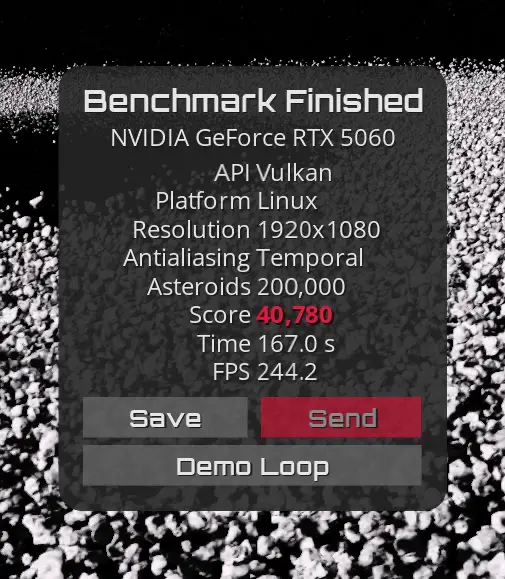
I ran an automated 7-stage test suite using Gravitymark (200,000 Asteroids, Vulkan 1080p, -vsync 0), averaging runs per stage to eliminate run-to-run noise and give a clearer picture of each stage’s impact:
| Stage | Score | Avg Core (MHz) | Peak Pwr (W) | Max Temp (°C) | Gain vs Stock (%) | Gain vs Prev (%) |
|---|---|---|---|---|---|---|
| 1. Stock Baseline | 36,518 | 2786 | 120.2W | 62°C | Baseline | – |
| 2. Memory Only (+3000 MHz) | 37,177 | 2784 | 123.8W | 63°C | +1.80% | +1.80% |
| 3. Core (+400) + Mem (+3000) | 39,492 | 3164 | 130.0W | 65°C | +8.14% | +6.23% |
| 4. Core/Mem + XBAR +100 MHz | 39,778 | 3161 | 130.5W | 65°C | +8.93% | +0.72% |
| 5. Core/Mem + XBAR +200 MHz | 40,301 | 3157 | 132.1W | 65°C | +10.36% | +1.31% |
| 6. Core/Mem + XBAR +250 MHz | 40,570 | 3155 | 132.7W | 65°C | +11.10% | +0.67% |
| 7. Core/Mem + XBAR +275 MHz (Peak) | 40,780 | 3165 | 133.8W | 65°C | +11.67% | +0.52% |
Overclocking the memory (+3000) and core (+400) alone got me to 39,492 points. Overclocking the XBAR by +275 MHz pushed performance to an all-time high of 40,780 points, without touching voltages (faster than the best 2080 Ti score but slower than the best 4060 Ti score). For the core clock, +400 MHz was the max I could push the card, as anything past it caused Vulkan device loss crashes (VK_ERROR_DEVICE_LOST and GPU has fallen off the bus in dmesg).
Note that my fan curve (ramping to 90% at 65°C) is probably what is keeping load temperatures flat despite the extra throughput.
Voltage Scaling
With Driver 610 unlocking voltage injection, I also tested whether adding positive voltage offsets (+10 mV to +25 mV) would push scores higher:
+10 mVOffset: ~40,106 points+25 mVOffset: ~39,679 points
Because the card is capped at a strict 150W power limit, adding extra voltage eats up power budget without delivering extra clock speed. That causes the card to bump against its 150W ceiling sooner, forcing the GPU to throttle clocks down slightly to stay under budget. Keeping voltage at stock gives the card the power headroom it needs to sustain top boost clocks, making the stock voltage with +275 MHz XBAR the real sweet spot.
I also tried pushing the XBAR offset further to +300 MHz, but started seeing timing issues and performance degradation (likely internal interconnect clock stretching or error-correction retries), which caused the benchmark score to drop.
Stability Testing (1-Hour GPU-Burn)
I stress-tested the final configuration (+400 MHz core, +3000 MHz memory, +275 MHz XBAR, Stock Voltage) with a continuous 1-hour run of gpu-burn. The GPU maintained 100% compute saturation with 0 memory or calculation errors, holding steady at 65°C without artifacting, clock throttling, or driver crashes.
Automation with LACT and systemd
Because ioctl offsets reset on reboot, I automated everything with LACT and a oneshot systemd unit.
/etc/lact/config.yaml
version: 5
daemon:
  log_level: info
apply_settings_timer: 0
gpus:
  10DE:2D05-196E:1448-0000:02:00.0:
    fan_control_enabled: true
    fan_control_settings:
      mode: curve
      static_speed: 0.5
      curve:
        40: 0.3
        50: 0.5
        60: 0.75
        65: 0.9
        70: 1.0
    power_cap: 150.0
    gpu_clock_offsets:
      0: 400
      1: 400
    mem_clock_offsets:
      0: 3000
/etc/systemd/system/nvidia-xbar.service
[Unit]
Description=Apply NVIDIA Blackwell XBAR Offset (+275 MHz XBAR, Stock Voltage)
After=lactd.service nvidia-persistenced.service
Wants=lactd.service

[Service]
Type=oneshot
RemainAfterExit=yes
ExecStartPre=/usr/bin/sleep 2
ExecStart=/usr/local/bin/set_xbar 275000 0

[Install]
WantedBy=graphical.target multi-user.target
Enable and start:
sudo systemctl daemon-reload
sudo systemctl enable --now nvidia-xbar.service
Done!
With a single C binary and a systemd unit, I now have a working Linux alternative to mVolt+ for Blackwell GPUs without relying on Windows or proprietary overclocking GUIs.
References
- LACT Feature Issue #1147: Runtime XBAR clock and per-domain MSVDD control on NVIDIA Blackwell
- Loong0x00 Gist: xbar_clock_demo.c
- GravityMark result for my overclocked 5060
P.S.
My daughter has turned 6 months, we are starting to give her solids :’(. Here is an image of the props and backdrop my wife created to take some pictures of her.
